
Starlink for Van Life in Europe 2026 — Our Real-World Setup
How we run satellite internet from the van across Europe: which dish, which plan, how we power it off 12 V, and what actually works after living with it full-time on the road.
Do you actually need Starlink?
If you use the van mostly for weekends and holidays and your work is light — maps, messaging, occasional emails — an eSIM alone is probably enough and costs a fraction of this. Starlink makes sense when your income depends on a reliable connection in genuinely remote places. If that’s you, read on. If not, our eSIM guide is a better starting point.
A note on our recommendations: most links in this guide are not affiliate links — we get no commission for most of what we recommend. The one exception is StarWifi: if you use our discount code, we earn a small commission. We only work with brands and products we’d genuinely use ourselves.
Reliable internet is what makes full-time van life sustainable when you also need to work — and for us, in the spots we actually park (mountain valleys, quiet tracks, crags miles from the nearest town), cellular alone never quite cut it. Starlink changed that. This is exactly how we use it: the dish, the plan, the mounting, the 12 V conversion that keeps it from murdering our batteries.
A note on supporting Starlink
We’re not comfortable with where the money goes — and we suspect many of you feel the same. But this is what actually works off-grid, and we’d rather be honest about that than pretend otherwise.
One thing up front, because it matters: Starlink changes its plans and prices constantly — names, data caps, monthly cost, hardware prices, even the in-motion rules have all shifted in the last few months alone. Everything below is accurate as of June 2026. Always confirm the current numbers for your country on starlink.com before you buy and make sure you have what you need. Our set up works for us, but everyone has different needs.
📋 In This Guide
Why we chose Starlink
We work from the van, and that work needs a connection that holds up for video calls and cloud-based apps — not just enough signal to load a map. We know people who plan their entire route around café WiFi and hotel lobbies — constantly scanning for a signal strong enough to take a call, cutting trips short because the next spot has no connection, or just sitting in a car park outside a McDonald’s for the third time that week. That’s not van life, that’s WiFi-life. And didn’t want to do it that way.
Tethering off a phone feels like the obvious fix, but in practice we found this being unreliable, patchy in the places that matter, and depending on what you do for work it can burn through a data plan faster than you’d expect — or hit throttle limits right when you need it most. It depends entirely on there being a cell tower within reach. It might work for you and many people, but we did not want to rely on this and wanted to not worry about it.
Works off-grid
Broadband anywhere with open sky — no mast, no cable, no campsite Wi-Fi.
Genuinely fast
Comfortably handles video calls, large uploads and streaming, not just browsing.
Weather-proof
In our experience cloud and rain make no real difference — only solid physical obstructions do.
Can run on 12V
With a conversion kit it runs straight off your leisure battery — which reduces the power intake.
The honest pros & cons
✓ What’s great
- Internet in places no cellular reaches — the whole point
- Fast and stable enough to actually work from
- Cloud and rain barely register; we’ve worked through both
- Plans are month-to-month — no contract, pause any time
- Set-up is genuinely plug-and-play once mounted
- Roam plans work across Europe without changing your address
✗ Worth knowing
- Needs open sky — trees over the van or a tall cliff right beside you will block it making it difficult or patchy.
- Power-hungry: a real consideration without solar and/or DC-DC charging
- Pricing and plans change often, and vary by country
- Hardware is a meaningful upfront cost
- Apparently roam data is deprioritised behind local home users in busy areas (rarely an issue where we park)
The hardware & how it actually works
The principle is simple: a flat antenna (the “dish”) talks to low-orbit satellites overhead and feeds an internet connection down a single cable to a router, which broadcasts Wi-Fi inside the van. That’s the whole system — antenna, cable, router, power.
We run the Standard dish (Gen 3) rather than the smaller Mini. The Mini is lighter, smaller and sips less power, but tops out at lower speeds; the Standard dish is the workhorse if you genuinely work off it. We bought ours directly from the official Starlink website — straightforward, and you’re guaranteed genuine hardware (worth saying, given the fakes floating around marketplaces).
For the router, we don’t use the standard Starlink one — we run a GL.iNet AXT1800 (Slate AX) travel router. This is because of the 12V conversion, where the original router works only on AC, It gives us a proper Wi-Fi 6 network.
Mounting & cable
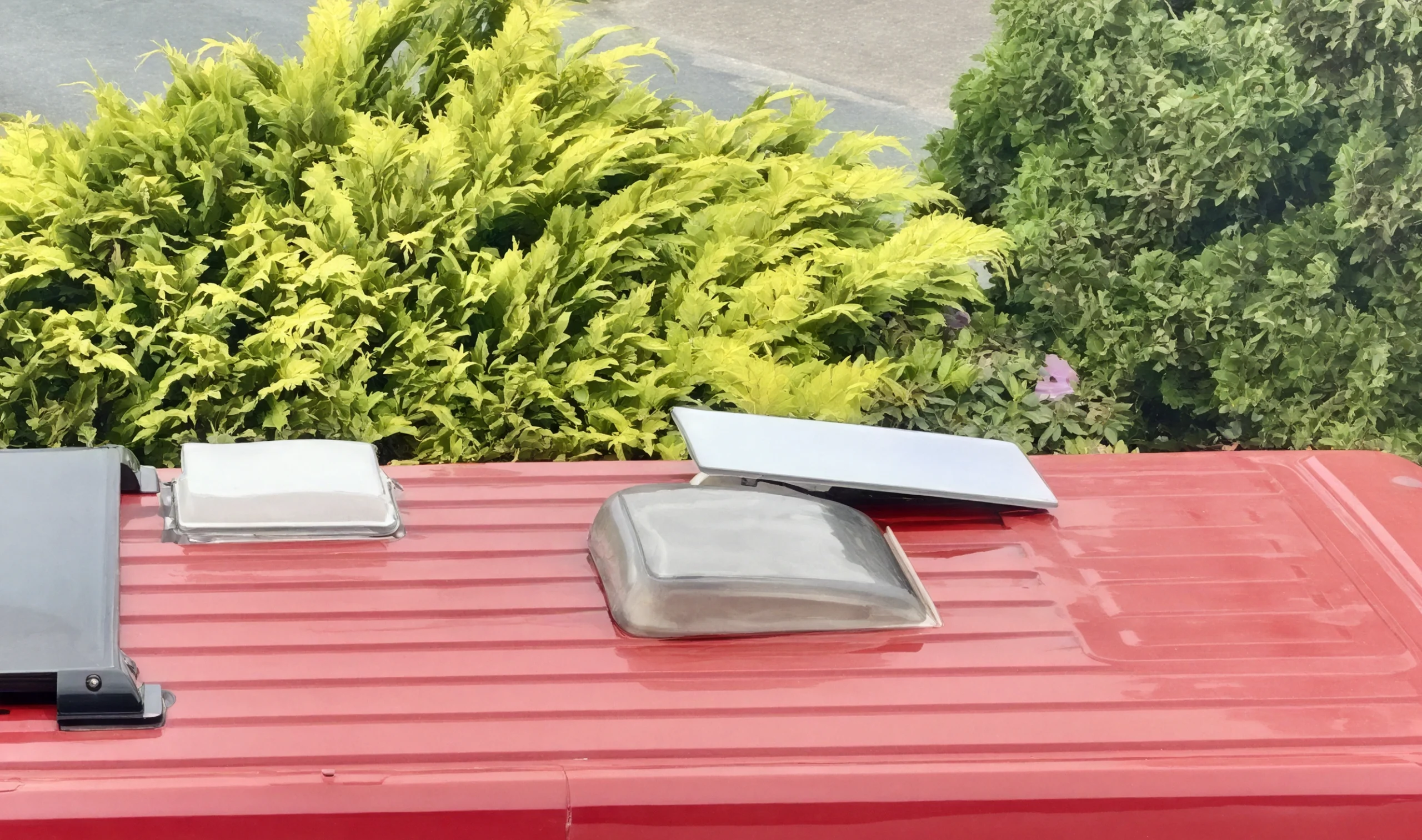
We keep ours permanently mounted on the roof using the standard mobility mount — it lives up there all the time, no setting up and taking down at every stop. For full-time travel that convenience is worth a lot; you turn it on and it works.
The trade-off with a fixed roof mount is obstructions: if you park under dense trees you can’t reposition the dish to find a gap. If you climb somewhere genuinely boxed-in, the alternative is to ground-deploy the dish on a longer cable in a clearer spot — but in practice we rarely bother, because most of the time the roof has enough sky.
The cable runs from the dish down into the van to the power kit and router. The big thing was the installation, adding the mount to the roof, sealing it properly and running the cable from the roof to the battery box where the conversion is and then the router— it’s the one part of the install worth taking your time over, because it’s a hole in your roof.
Making it work day to day
Honestly? It’s been shockingly good nearly everywhere. Two years in, the reliability has surprised us. The headline lessons from real use:
Sky, not weather, is the enemy
Clouds and rain make no real difference. What kills it is physical obstruction — dense trees directly over the van, or a 100 m cliff right beside you.
Open is best
The more open the antenna’s view of the sky, the better. On top of a hill with nothing overhead it’s flawless; boxed into a forest pull-in it struggles.
~5 minutes to live
Flick the switch and it takes a few minutes to acquire and come online. We just turn it on when we sit down to work.
Very few drop-outs
In open spots the connection is stable enough for back-to-back video calls — the on/off flicker only shows up under partial obstruction. Best is nicely the top of a mountain! (How convenient…:))
For remote work it’s handled everything we throw at it — cloud-based work apps, collaboration tools and video calls running all day. The honest caveat is the obstruction one: if your job depends on never dropping a call, choose your park-up with the antenna’s sky view in mind, the same way you’d choose it for sun on your solar panels.
Power & the 12V conversion kit
This is the part most guides skip, and it’s the most important one for van life. Starlink ships with a mains (AC) power supply. In a van, running that means powering an inverter to turn your 12 V battery into AC — based on the type of inverters, this might waste a chunk of energy doing it. For a device that’s on for hours, that waste can add up fast.
Our fix is a 12 V conversion kit that powers the dish directly from your battery, skipping the inverter entirely. We use the StarWifi Plug & Play V3 Kit (the 12V/24V power supply, without router — we use our own GL.iNet), which cost €198.33. It plugs in with no cable cutting and doesn’t void the Starlink warranty.
📱 One extra step in the app — bypass mode
Because you’re replacing the Starlink router with your own (we use the GL.iNet), you need to tell the Starlink app you’re doing so — otherwise it’ll find the antenna but not the router and won’t connect properly. In the app, go to Settings and enable Bypass Mode. This lets Starlink know the original router isn’t in the loop. Starlink’s official guide on how to do this is here.
⚡ The number that matters
Running the dish through the inverter on AC, we measured roughly (With inverter/Antenna+Router) 70 W. Switching to the 12 V kit dropped that to around 30 W — about half the draw. Over a working day that’s the difference between Starlink being a constant worry and it being a non-issue based on your charging system.
Our wiring is simple: the kit runs straight from our 12 V junction/busbar, fed by our Liontron LiFePO4 battery. The Starlink antenna cable coming from the dish joins the kit as well. Then another Ethernet cable goes to our router which delivers Wifi. We also fitted a physical on/off switch in the van so we can kill it completely when we’re not using it (more on that below, note that we are using a DC to DC system to charge while driving along with a 400W Solar panel on the roof which keeps it charging). As always with a high-draw 12 V device, use appropriately rated fusing and cable gauge for the run length — if you’re not confident sizing that, get it checked.
12V conversion kits for Starlink Gen 3
StarWifi Plug & Play V3 Kit — what we use
The only European-native option we found — they ship internationally across Europe, Switzerland and the UK, free on orders over €150.
The kit in our van. Power supply only (no router), plug-and-play with no wire cutting, Gen 3 compatible, 12V/24V. We went for the kit alone since we already run our own GL.iNet router, but if you’d rather keep things simple, StarWifi also sells the full package with a router included. We’ve also dealt with their support directly: questions get answered fast, and they’re genuinely happy to help with setup tips if you need them. They ship to the whole Europe in 4 to 8 business days as well so that’s a big part of why we recommend them.
€198.33 · Buy from StarWifi →
Use code ROCKVANLIFE and get an automatic 5% discount at checkout.StarMount Systems Star-Box
US-based but explicitly ships to Europe and covers EU consumer rights (14-day returns). All-in-one: 12V conversion with a built-in WiFi 6 router, plug-and-play, no wire cutting. A solid option if you want everything in one box rather than pairing a converter with your own router.
💶 Budget route — Amazon
We’d rather not send you to Amazon, but if budget is the priority: search “Starlink Gen 3 12V converter” or “Starlink V3 12V conversion kit” on Amazon and you’ll find generic step-up converters for €40–70. Same PoE injector principle, no wire cutting. Quality and support vary and are not guaranteed — no named brand behind them if something goes wrong, but they could work. Your call.
Which plan — and what it costs
For van life you want a Roam plan (Starlink’s mobile tier, formerly “RV”). Crucially, the fixed Residential plans are locked to your home address and won’t work if relocating somewhere else — so ignore those for travel, however cheap they look.
Roam itself comes in tiers, and this is where it pays to read carefully because the structure shifts. As of June 2026 the broad shape in Europe is:
Approximate monthly prices, Europe, June 2026 — they vary by country and VAT and change often. Verify on starlink.com.
| Plan | Data | Coverage | Approx. price (EU) | Best for |
|---|---|---|---|---|
| Roam (entry) | ~100GB full speed, then unlimited slow | Your continent (e.g. Europe) | ~€40–55 | Occasional / light use |
| Roam Unlimited (Regional) | Unlimited | Your continent (e.g. Europe) | ~€72–89 | Full-time travel within Europe |
| Roam Global | Unlimited | Worldwide | ~€175 | Crossing continents |
💶 What we actually pay
We’re on Roam Unlimited (Europe), registered in Germany, at €89/month. It’s unlimited, works across the European countries we travel through, and we pause it (see below) when we’re not using it. For pure within-Europe van life it’s the sweet spot — Roam Global is roughly double and only worth it if you’re leaving the continent.
A few things that apply whichever Roam tier you pick: there’s no contract, you can change tier or pause in the app, and once past any data cap the connection drops to a slow-but-usable speed (fine for email, calls and messages) rather than cutting off. Roam traffic is deprioritised behind local Residential users when a given area is congested — in theory a downside, in practice something we’ve genuinely never noticed, because the remote, rural spots vanlifers park in simply don’t have many home subscribers competing for the same capacity.
💡 The two-month rule — what it means for European van life
Starlink’s terms technically limit continuous use outside your registered country to 60 days per trip. In practice, registered in Germany and travelling across Europe — Spain, France, Portugal, Italy — we’ve never once been interrupted or flagged in two years. Within licensed European countries, enforcement appears to be minimal. If you’re staying within Europe on a Roam plan, don’t let it put you off. Just worth knowing it exists on paper.
UK vs mainland Europe — the differences that catch people out
This trips a lot of people up, so it’s worth being explicit. Starlink prices each country independently, and the rules aren’t identical across the Channel.
🇬🇧 United Kingdom
- Priced in £; hardware includes 20% VAT (the Standard Kit has been around £449)
- Public Roam options are typically 100GB and Unlimited
- The UK counts within the European Roam region for regional plans
- Residential pricing sits in tiers (roughly £40–80/mo depending on speed)
🇪🇺 Mainland Europe
- Priced in €, and the figure varies by country because VAT ranges ~17–27%
- Germany, France and Poland tend to be among the cheaper markets
- Hardware has commonly been ~€299–349
- Same Roam structure, but the exact tier names/prices can differ market to market
The practical takeaway: check the price on starlink.com for the specific country you’ll register in, including VAT at checkout — that’s the only number that’s truly reliable. Where you register also sets your “home country” for the roaming rules above.
Pausing & cancelling
Because Roam is month-to-month, you’re never locked in. Two practical options:
- Standby mode — what we use. For a small monthly fee the service goes dormant (with unlimited very-low-speed data) and you keep your account and equipment ready to reactivate instantly. Ideal if you’re off the road for a few weeks but coming back.
- Cancel — worth it only if you’re stopping for a long stretch, since you can resubscribe later. There’s no penalty either way.
We toggle Standby on and off through the season rather than paying full whack for months we’re parked up or back home.
Starlink + eSIM: how we actually split the two
We don’t use Starlink for everything — that would be overkill and a waste of power. Our setup is deliberately two-layered:
🛰️ Starlink — for work & screens
- Anything on a computer goes through Starlink
- Working sessions, video calls, large uploads
- Watching a film of an evening
- Switched on when needed, off the rest of the time
📱 eSIM — for everyday phone use
- Maps, Park4Night, weather, topos, messaging
- Day-to-day browsing on the phone
- Always on, sips data, costs little
- Works while driving, when Starlink is off
So the rule of thumb in our van is: phone stuff → eSIM; computer stuff → Starlink. The eSIM is always running in the background for the little things; Starlink gets switched on (it’s live in about five minutes) when we sit down to work or want to stream. It’s the combination that makes the whole thing efficient — neither alone would do the job as well.
The verdict: worth it, if you work from the van
For a full-time van lifer who needs to work from anywhere, Starlink has been one of the best decisions we’ve made — it untethers you from towns and campsites and lets you park where the climbing is. It isn’t free, it isn’t weightless on your power system, and you have to respect the sky and the shifting rules. But run on a Roam Unlimited plan, powered sensibly off 12 V, and paired with an eSIM for the everyday, it’s been quietly brilliant.
If you only need maps and messaging, save your money and just run an eSIM. If your income depends on a connection in remote places, Starlink earns its keep.
Frequently asked questions
Can you use Starlink in a van across Europe?
How much power does Starlink use in a van?
Do you need a 12V conversion kit for Starlink?
Does Starlink work in bad weather or cloud?
Can you pause Starlink when you’re not travelling?
Starlink or eSIM for van life — which do you need?
Which Starlink dish is best for a campervan?
Primary: Starlink van life · Starlink for campervan Europe · Starlink Roam Europe 2026 · Starlink 12V conversion · Starlink van setup | Secondary: Starlink Roam plan Europe · Starlink power consumption van · best Starlink plan van life · Starlink vs eSIM van life · Starlink Gen 3 campervan · 12V Starlink kit · Starlink UK vs Europe price | Long-tail: how to run Starlink off 12V in a van · how much power does Starlink use in a campervan · can you use Starlink Roam across Europe · best Starlink plan for full time van life · Starlink for remote work van life · do you need a 12V kit for Starlink · Starlink two month roaming rule Europe
📚 Helpful Climbing Resources
Essential guides, tips, and advice for your climbing adventures
🔧 Gear Lab
View all →
DMM Renegade Review: Four Years on My Trad Harness
Read more →
Black Diamond Solution Review — The All-Rounder, Updated for 2026
Read more →🚐 Road Trip Essentials
View all →
10 Underrated European Sport Climbing Destinations (That We Actually Drove To)
Read more →
Van Life Electrical Setup 2026 — Our Exact Power System
Read more →📖 Climber's Handbook
View all →
Beginner Climbing Gear List 2026 – Everything You Need to Start Climbing Outdoors
Read more →